Product Description
Mini Wireless Microphone
DJI Mic Mini 2
More Than Sound
- Lightweight & Versatile, Compact Storage [1]
- High‑Quality Audio, Mixed Device Transmission [2]
- Three Voice Tone Presets [3], Two-Level Noise Cancelling [4]
- Automatic Limiting to Prevent Audio Clipping [5]
- DJI OsmoAudio Direct Connection [6]
- 48-Hour [7] Operating Time & Power Saving
Lightweight & Versatile, Compact Storage [1]
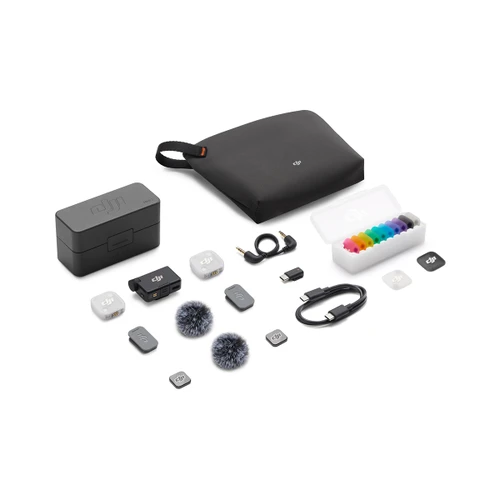
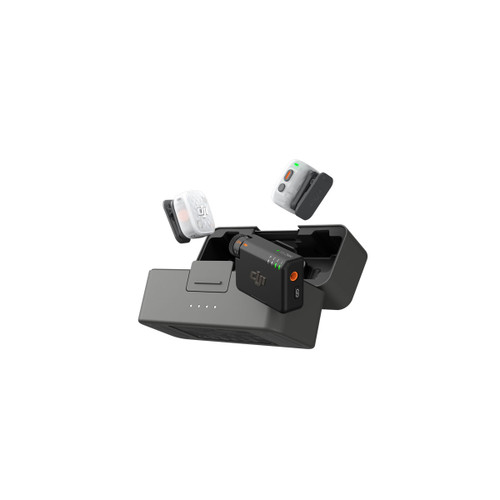
The 11g [8] transmitter is ultralight and stylish with colorful covers [9]. The standard case (2 TX + 1 RX) organizes all essentials, while the mobile case (1 TX + 1 mobile RX) is perfect for efficient, on-the-go recording.
3 Voice Tone Presets [3] To Match Your Style
Three distinct voice presets are supported. Regular delivers natural and balanced sound for daily recording. Rich for fuller lows, and Bright for extra clarity in streaming or teaching.
Two-Level Noise Cancelling for Focused Sound
The Basic level is ideal for quiet indoor settings, reducing noise while preserving vocal clarity. The Strong level excels in noisy environments, significantly cutting ambient noise for clearer vocals.
High-Quality Audio, Mixed Device Transmission [2]
Omnidirectional wireless recording precisely captures details from multiple sources. Supporting multi-generation device mixing, and paired with a plug-and-play mobile receiver for flexible compatibility, it makes high-quality multi-source recording seamless.
Automatic Limiting to Prevent Audio Clipping [5]
When automatic limiting is enabled, DJI Mic Mini 2 automatically lowers the volume if the audio input is too high, preventing clipping and ensuring reliable audio quality. This is especially useful for content creators.
Wide Compatibility [10] for Diverse Scenarios
The new plug-and-play mobile receiver makes two-person recording simple. The DJI Mic Mini Receiver is compatible with cameras, phones, tablets, and PCs—ideal for recording from vlogs to professional interviews.
5-level Gain Adjustment & Safety Track
Roll the dial on the receiver to quickly adjust the gain, ensuring crystal-clear recording. Enable a backup track to ensure that you never lose a great take.
48-Hour Operating Time [7], Intelligent Power Saving
For a transmitter, the operating time can be 11.5 hours. For a receiver, it reaches 10.5 hours. With a full-charged charging case, you can enjoy up to 48 hours of operating time. Plus, five intelligent power-saving modes prevent power waste and ensure efficient power use.
DJI OsmoAudio Direct Connection [6]
The transmitter supports direct connection to select DJI products without a receiver, simplifying your gear and workflow.
* All product images and videos on this page are for reference only. Actual products may vary. Please refer to the actual product.
1. When storing accessories in the charging case, avoid stacking to prevent receiver damage. For storage details, refer to the official product page of DJI Mic Mini 2.
2. The DJI Mic Mini Receiver and the DJI Mic Series Mobile Receiver support mixed connection with up to two transmitters at a time. For details, please visit the Downloads page of the DJI Mic Mini 2 website for the DJI Mic Series Mobile Receiver Cross-Model Compatibility List.
3. The Voice Tone Preset modes can be selected via the DJI Mimo app, with the default set to Regular. This function is not supported when the transmitter is directly connected to a phone via Bluetooth.
4. Strong and Basic noise cancellation levels can be set via the DJI Mimo app, or directly on the product interface when using a compatible DJI product connected to one or more transmitters via DJI OsmoAudio Direct Connection. When the transmitter directly connects to the phone, the noise cancellation level cannot be adjusted in the DJI Mimo app; it defaults to the Strong level. The noise cancellation switch on the DJI Mic Series Mobile Receiver allows quick adjustment of noise cancellation levels (Off = O, Low = L, High = H).
5. When the DJI Mic Mini 2 Transmitter is connected to the DJI Mic Mini Receiver/DJI Mic Series Mobile Receiver, this feature is enabled by default and can be turned on/off via the DJI Mimo app. When the transmitter is directly connected to a phone via Bluetooth, this feature is enabled by default and cannot be turned off. When a compatible DJI product is connected directly via OsmoAudio, settings can be adjusted on the product interface.
6. The DJI Mic Mini 2 Transmitters can directly connect to select DJI products. For details, please visit the Downloads page of the DJI Mic Mini 2 website for the OsmoAudio Compatibility List.
7. Measured using DJI Mic Mini 2 (2 TX + 1 RX + Charging Case) paired with a fully charged charging case, with noise cancellation off, during close-range audio recording under open, interference-free, unobstructed conditions, with both transmitters connected to the receiver and the receiver connected to a camera via the Camera Audio Cable (3.5mm TRS).
8. The weight of a single transmitter does not include the magnetic clip and magnet.
9. Sold separately. Obsidian Black and Glaze White magnetic front covers are standard accessories included with DJI Mic Mini 2 (2 TX + 1 RX), so users do not need to purchase them separately.
10. For a list of compatible devices, please refer to the Downloads page on the DJI Mic Mini 2 official website.
11. To achieve the 4TX + 8RX setup or four-channel output, additional accessories must be purchased separately. For details, refer to the compatibility list on the Downloads page of the official DJI Mic 3 website.
12. When used with a DJI Mic Mini Receiver and two DJI Mic Mini 2 Transmitters, the transmission distance can reach up to 400 meters in an open, interference-free and unobstructed environment.
Additional Details
| MPN | 24141452 |
|---|